ScriptExpert Local Development Stack Explained
ScriptExpert bundles PHP, Composer, Apache, MariaDB/MySQL and Node.js into one managed local development stack, with per-project PHP versions, framework-aware Preview and health checks.
Meet ScriptExpert Code Editor — a desktop development workspace that combines a source editor, AI agents, an integrated terminal, a framework-aware Preview and a managed local development stack for PHP web development.
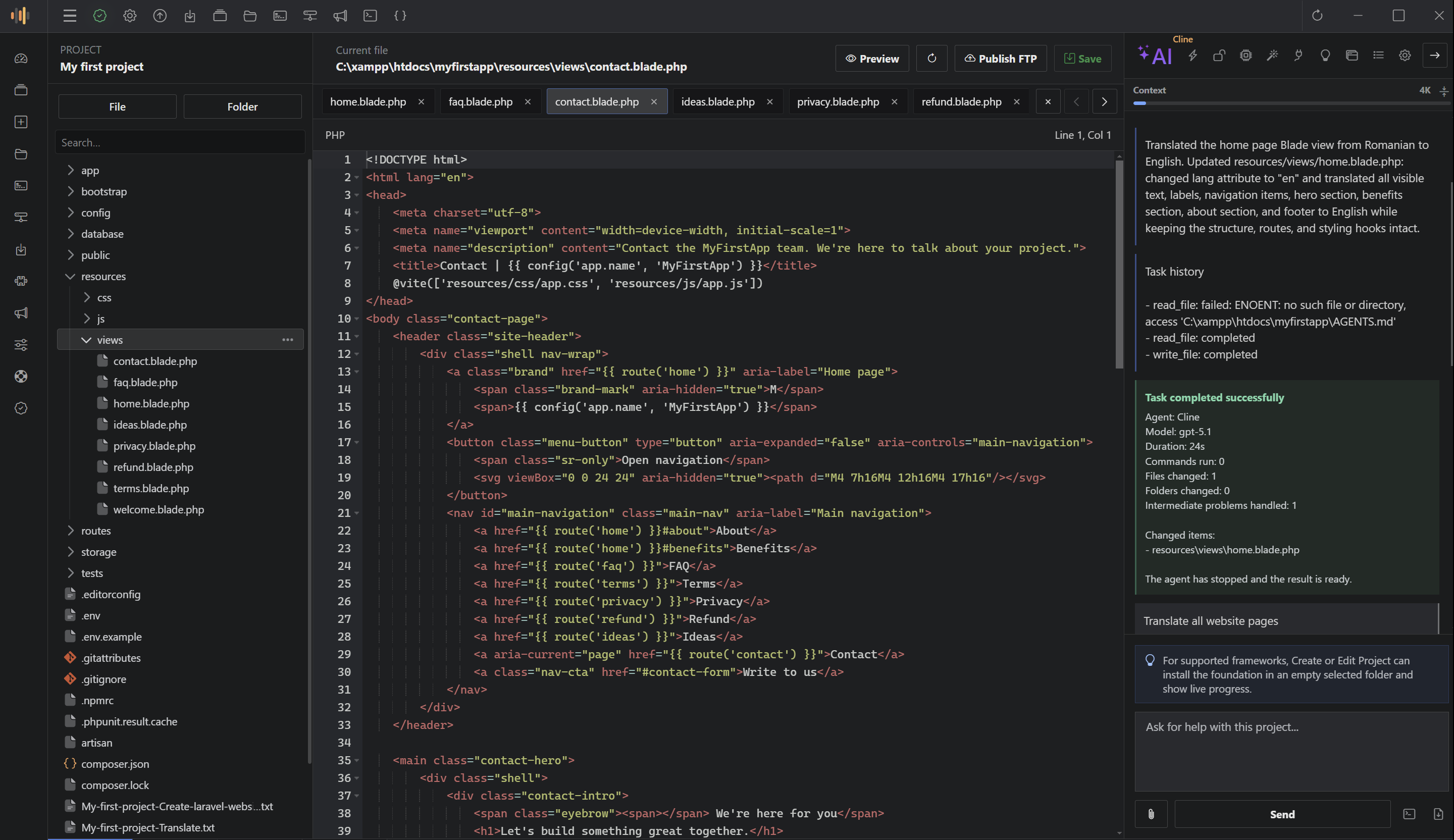
ScriptExpert Code Editor is a desktop development workspace built for people who build and maintain PHP web applications. It brings together a source editor, an AI coding agent, an integrated terminal, a framework-aware Preview and a managed local development stack — PHP, Composer, Apache, MariaDB/MySQL and Node.js — so you can work on a project from first edit to running preview without leaving one application.
ScriptExpert is designed for PHP and Laravel developers, freelancers and small teams who want a faster setup and a more organized workflow. It is also useful for plugin and extension authors who build and test products that run on top of the same local stack. If your day involves switching between an editor, a terminal, a database client, a browser and an AI chat, ScriptExpert puts those pieces next to each other in one desktop window.
Modern development often means moving between an editor, an AI assistant, a terminal, local services, browser previews and project documentation. ScriptExpert combines them:
The built-in AI agent helps you plan and apply changes while you stay in control:
ScriptExpert installs and manages the tools most PHP web projects rely on — PHP, Composer, Apache, MariaDB/MySQL and Node.js. On Windows the tools are portable packages verified against a published checksum; on Linux the editor uses your distribution’s package manager. You can choose a different PHP version for each project, and database data is preserved when the editor updates.
For supported frameworks, ScriptExpert detects the project type, reads its routes and opens Preview on the correct entry point. An already running Laravel preview server is reused instead of starting a new process, and the editor respects the configured URL and port.
The project dashboard shows stack information, running services, source statistics, integrations and health checks, so you can see the state of a project at a glance and fix a missing or misconfigured runtime quickly.
ScriptExpert keeps the latest saved versions of every edited file. Inspect the differences and restore a previous version when a change does not work out, before moving to the next task.
You can browse, purchase and install plugins from the integrated marketplace. The License Manager plugin, for example, adds a complete licensing control panel — products, license types, customers, orders and keys — with an installer that deploys the License Server on your own hosting.
Report a bug, send advice or request a feature from a clean dialog with up to five screenshots, and follow the status of every report. When the team converts feedback into a support ticket, you get a link and email updates, and reply directly from ScriptExpert.app.
ScriptExpert ships in separate editions and release channels, so each installation receives a build that matches its platform and license. Envato buyers get an automatic ScriptExpert.app account the first time their purchase code is verified, with login credentials sent by email, so downloads and tickets stay accessible.
ScriptExpert follows the same product workflow across supported Windows and Linux releases.
Explore ScriptExpert Code Editor and keep your whole development workflow in one desktop workspace.
Aucun commentaire pour le moment.
ScriptExpert bundles PHP, Composer, Apache, MariaDB/MySQL and Node.js into one managed local development stack, with per-project PHP versions, framework-aware Preview and health checks.
How ScriptExpert keeps AI-assisted development organized with separate tasks, local project context, workspace access levels, live diffs and configurable AI providers.
Connectez-vous à votre compte client avant d’envoyer un commentaire. Vous reviendrez ensuite automatiquement à cet article.