ScriptExpert AI Agents and Project Tasks
How ScriptExpert keeps AI-assisted development organized with separate tasks, local project context, workspace access levels, live diffs and configurable AI providers.
ScriptExpert bundles PHP, Composer, Apache, MariaDB/MySQL and Node.js into one managed local development stack, with per-project PHP versions, framework-aware Preview and health checks.
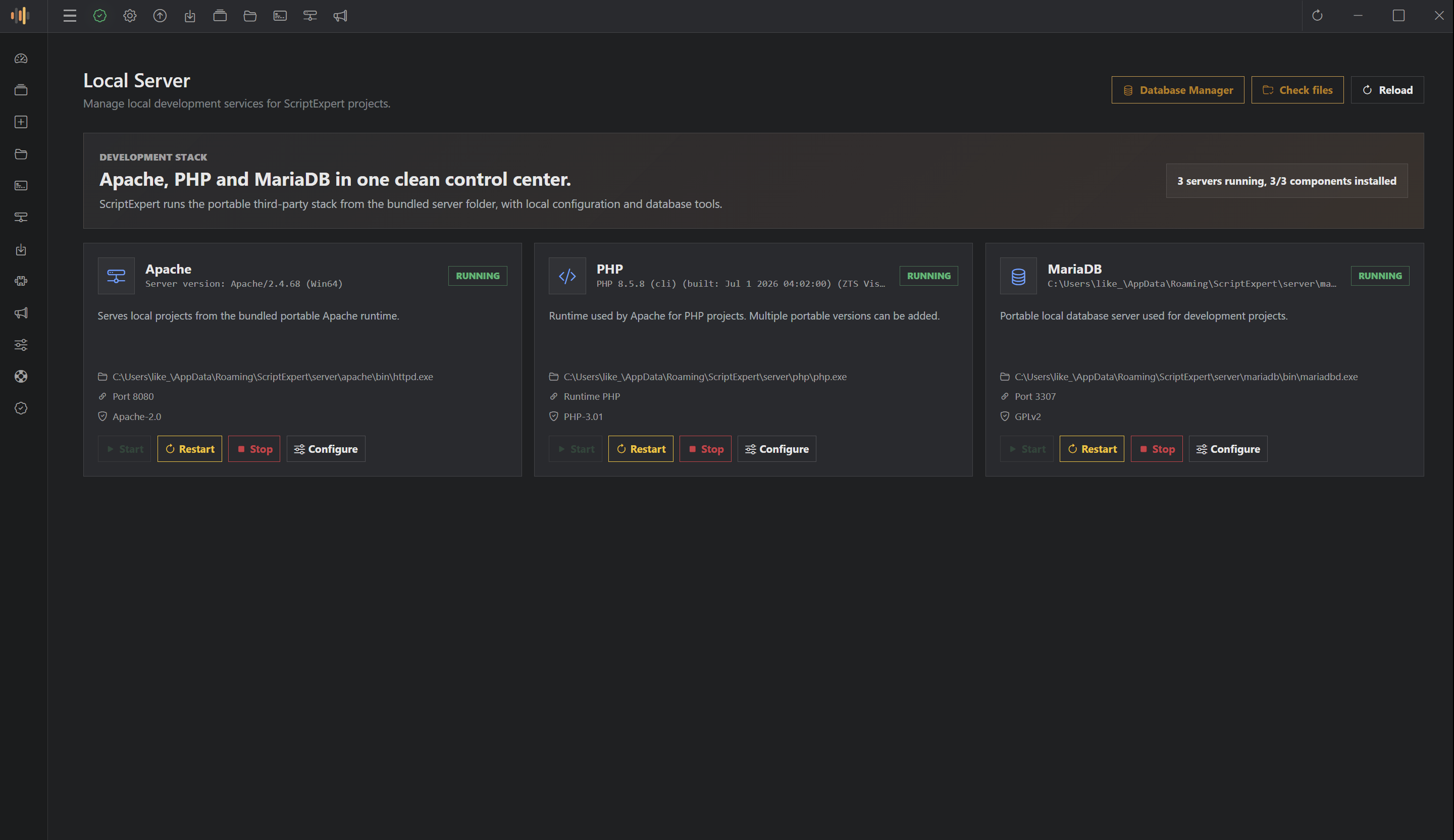
ScriptExpert Code Editor ships with a built-in local development stack, so you can go from a freshly installed desktop to a running PHP application without juggling separate installers, configuration files and background services. The stack is installed and managed from inside the editor, and every project can choose the runtime it needs.
The local development stack bundles the tools most PHP web projects depend on:
php.ini and the extensions common frameworks expect, including OpenSSL.ScriptExpert installs these tools as extensions, and delivery depends on your platform.
On Windows each tool is a portable package stored under your user’s ScriptExpert data directory — no system-wide service registration needed. Packages are downloaded from the configured extension catalog and verified against a published SHA-256 checksum before installation. PHP and Apache include the required Visual C++ runtime DLLs so they also start on a clean Windows installation.
On Linux ScriptExpert uses your distribution’s package manager, because PHP and Apache do not publish one binary that works everywhere. After verifying a small signed catalog recipe, the editor asks for authorization through polkit/pkexec and installs the runtimes with apt-get, dnf, pacman or zypper. The distribution itself downloads, verifies and updates the runtimes.
Different projects often need different PHP versions. ScriptExpert lets you select the installed PHP version for each project individually, so a legacy project and a current Laravel application can coexist on the same machine without global version switching.
Classic PHP files and framework public entry points (like Laravel’s public/index.php) can be served through the configured Apache address and port. The editor understands the application’s public directory, so Preview opens the correct entry point instead of the project root.
The local database engine keeps your data under the ScriptExpert data directory. MariaDB data is preserved during runtime updates, so updating the editor does not wipe your local databases.
Node.js is available for projects that compile assets, run build scripts or use npm-based tooling, keeping the PHP backend and JavaScript front end in one workspace.
ScriptExpert detects the project framework and uses it to drive Preview:
php artisan serve process every time.The project dashboard surfaces stack information, running services, source statistics, integrations and health checks. If a runtime is missing or misconfigured, the editor can guide you to install or repair it — for example, repairing the PHP configuration when a required extension such as OpenSSL is not enabled.
ScriptExpert follows the same product workflow across supported Windows and Linux releases. Editions and release channels are kept separate so each installation receives a compatible build for its platform and architecture.
From there, editing, terminal commands, database work and Preview all happen in the same workspace, with the local development stack managed for you.
Explore ScriptExpert Code Editor and set up your local development stack today.
No comments yet.
How ScriptExpert keeps AI-assisted development organized with separate tasks, local project context, workspace access levels, live diffs and configurable AI providers.
Meet ScriptExpert Code Editor — a desktop development workspace that combines a source editor, AI agents, an integrated terminal, a framework-aware Preview and a managed local development stack for PHP web development.
Sign in to your customer account before submitting a comment. You will return to this article after authentication.