ScriptExpert Local Development Stack Explained
ScriptExpert bundles PHP, Composer, Apache, MariaDB/MySQL and Node.js into one managed local development stack, with per-project PHP versions, framework-aware Preview and health checks.
How ScriptExpert keeps AI-assisted development organized with separate tasks, local project context, workspace access levels, live diffs and configurable AI providers.
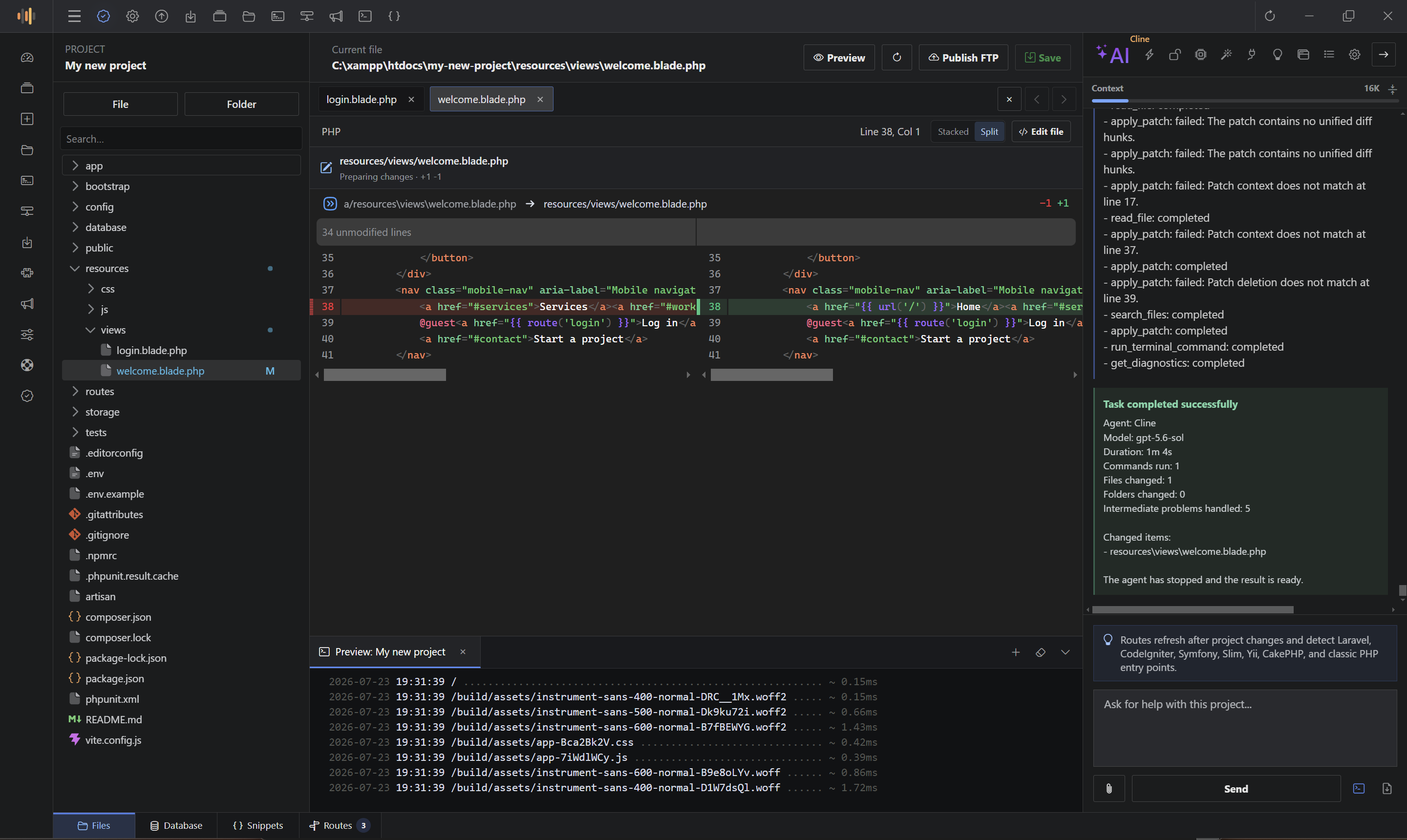
ScriptExpert Code Editor puts an AI coding agent directly inside the project workspace, so you can plan, review and apply changes without copying files and context between a browser, a chat window and an editor. Each AI task stays separated, keeps its own conversation and project context, and can be reviewed through the editor’s diff and history controls before you move on.
Every AI task runs as its own session with its own visible conversation, selected files and task history. Switching to another task does not mix contexts, so a feature discussion, a bug investigation and a refactoring stay independent and easy to follow.
When you want an implementation outline before any file is touched, use plan mode. The agent produces a step-by-step plan you can review first. When you are ready, execution-focused workflows apply the changes to the selected project.
You control what the agent is allowed to do on each project:
ScriptExpert supports configurable cloud, OpenAI-compatible and local AI workflows. You decide the provider and keep your own credentials. Local options such as Ollama let you work with a model running on your own machine, while Model Context Protocol (MCP) integrations can extend the agent with additional tools.
Task activity, open tabs and project navigation stay inside the application. The editor does not automatically send unrelated project history to an AI provider — only the content you intentionally include in a task is shared.
Choose how much project context the agent uses. An Auto mode keeps usage light and friendly for free tiers, while a Standard mode provides a richer context for larger tasks.
As the agent edits files, the editor shows live diffs so you can see exactly what is changing. Each changed file keeps its own diff controls in the editor toolbar, and you can inspect the result in stacked or split view. File history also keeps the latest saved versions of every edited file, so you can restore a previous state when needed.
The agent is powered by Cline, integrated into ScriptExpert so the conversation, live diffs, project tree and review controls live together in one desktop workspace.
Use AI agents in ScriptExpert Code Editor and keep every task organized from plan to review.
No comments yet.
ScriptExpert bundles PHP, Composer, Apache, MariaDB/MySQL and Node.js into one managed local development stack, with per-project PHP versions, framework-aware Preview and health checks.
Meet ScriptExpert Code Editor — a desktop development workspace that combines a source editor, AI agents, an integrated terminal, a framework-aware Preview and a managed local development stack for PHP web development.
Sign in to your customer account before submitting a comment. You will return to this article after authentication.